
Stocktwits has been a leading stock platform for tracking market sentiment, trading ideas, and connecting with traders worldwide.
But as personal and data privacy concerns grow, many users want to know how to delete their Stocktwits account—and make sure all associated cryptocurrency data is completely removed.
In this step-by-step account deletion guide, you’ll learn precisely how to do both, alongside tips to protect your digital footprint going forward.
keynote: Delete Stocktwits Account
For PC(web): Login to your account and go to Account Settings>Deletion Option Select “Close account” or “Delete account.”
For Mobile: Open the Stocktwits app and go to Account Settings>Deletion Option Select “Close account” or “Delete account and confirm the action.
What to Consider Before Deleting Your Stocktwits Account
Before deleting your account, consider the implications:
- Loss of Access: You will permanently lose your account, followers, trading history, and all community insights.
- Permanent Action: Account deletion cannot be reversed. Think carefully and save any important content.
- Data Persistence: Some data may remain in backups or for legal reasons even after deletion.
- Backup Important Data: Download your data before deleting your account to keep records for your reference.
- Finality: Account deletion is typically irreversible—make sure you download or save any important posts or trading ideas.
Step-by-Step Guide to Delete Your Stocktwits Account and data (Web & Mobile)
The process of account deletion on Stocktwits account is quite identical on website and mobile app. you can follow the suitable method.
Step 1. Deleting Personal Data and Information
Using Website
- Go to official Stocktwits website and login using email and password to the account you wish to delete.
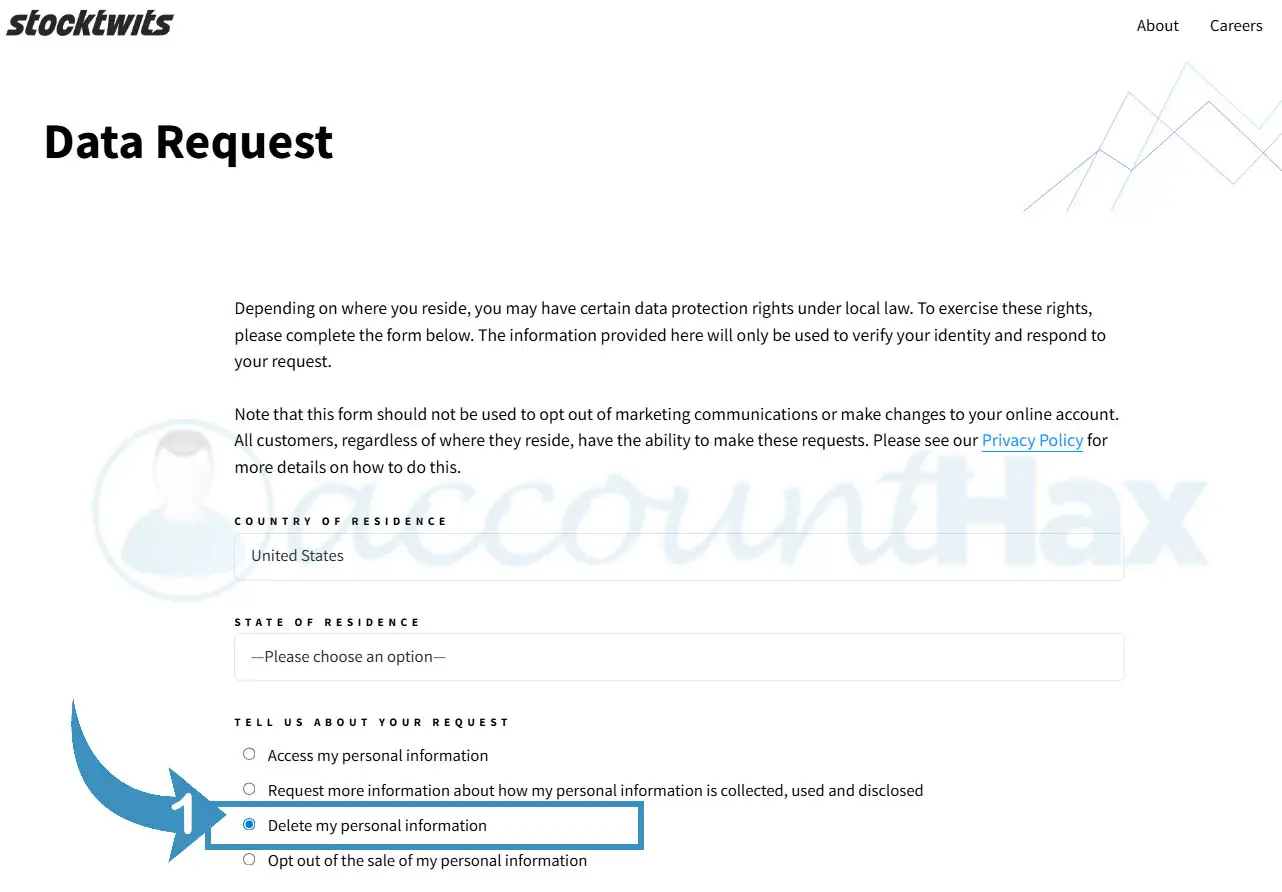
- Here on the data deletion page Enter details into the form and choose “Delete my personal information” under “Tell Us About Your Request”.
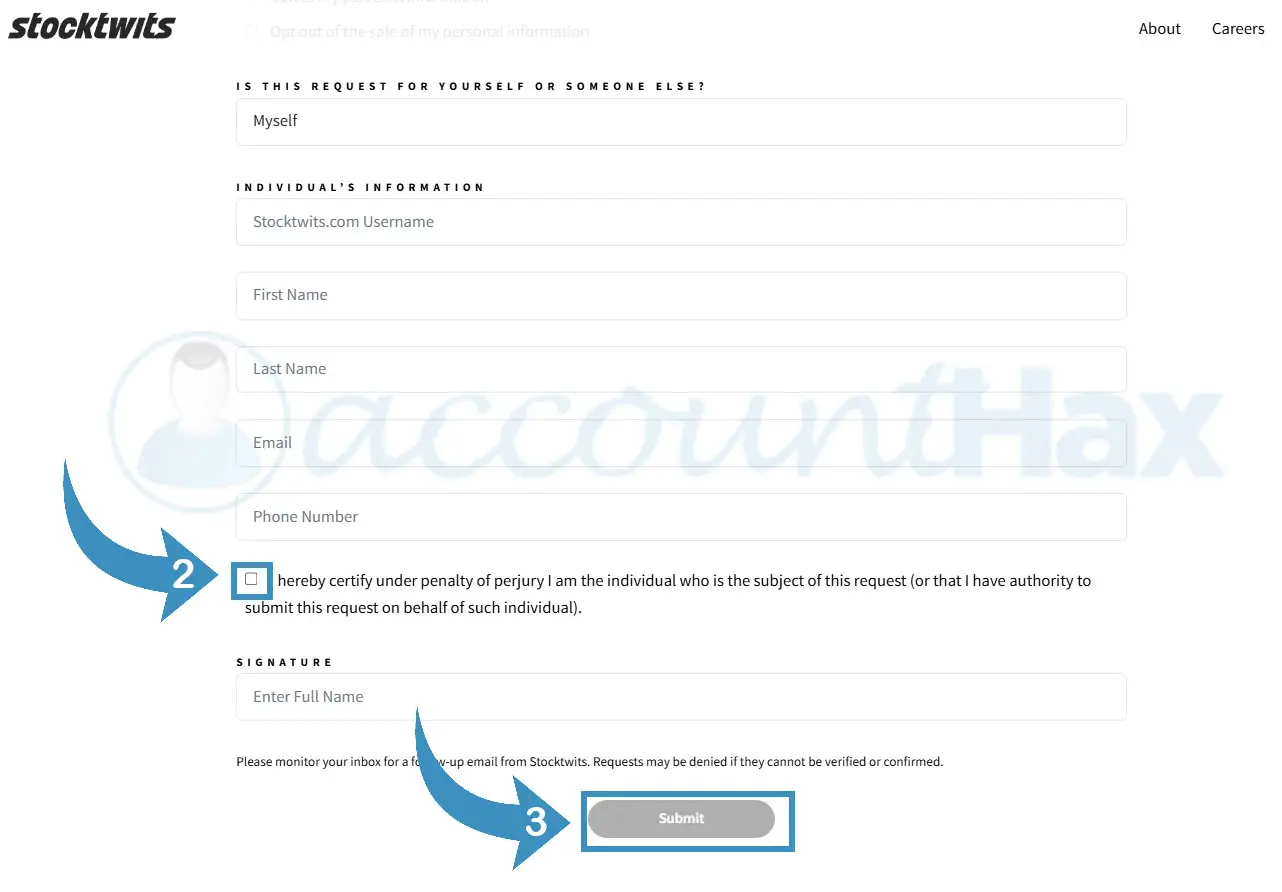
- You will get a confirmation email once you have successful submitted the data deletion request.
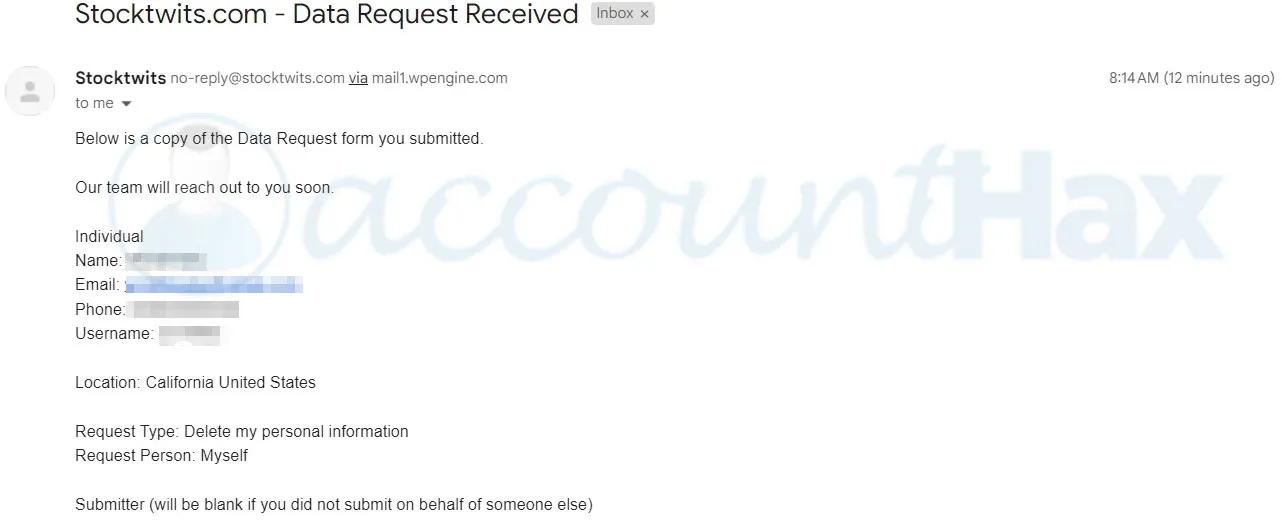
The deleting process may take 7-15 working days and you will get a confirmation mail once the data is deleted.
From Android Mobile App
- Open the Stocktwits app on your mobile and login to your account.
- Click on hamburger menu on the top left corner.
- On the setting page click on Help.
- Tap on Data Request/Deletion.
- Complete the form with relevant details and submit.
- Once submitted, you will get a confirmation message about the account data deletion process.
From iOS Mobile App
- Sign in to StockTwits’ iOS application using your username and password.
- Tap the More button in the bottom lower part of the app.
- Tap on Settings.
- Look for the Brokerage Connections under Scroll Down and Tap.
- Go here to unsubscribe your outsourced brokerage accounts joined by the StockTwits profile you own.
- After removing the brokerage connections, go back to the Settings menu.
- Find out the Delete Account option under the Privacy or Security item.
- Click on the Delete Account option and follow the instructions to confirm your account deletion.
- Enter your password and click cancel my account to finalize the deletion process of your account.
Once you have submitted the data deletion request you are ready to delete you account by sending a account deletion email.
Step 2. Deleting Stocktwits account
- Go to your mail service provider’s login page.
- Enter your email address and password, then click the Sign In button.
- Once logged in, click the Compose button to start a new email.
- Type “support@stocktwits.com“.
- In the Subject field, type “I want to delete my StockTwits account.”
- In the body of the email, state clearly and concisely why you want to delete your StockTwits account.
- Be sure to include your user ID and email address.
- Click on the Send button to send the email.
- Wait for a response from StockTwits, which can take 24 hours to 60 days.
Step 3. Deleting All Cryptocurrency-Related and personal Information
Simply deleting your account may not erase all cryptocurrency-related data stored by Stocktwits. To ensure complete removal:
- After deleting your account, contact Stocktwits support directly via their help channels.
- Clearly request the deletion of any cryptocurrency-related information, such as posts, digital wallet links, or transaction data.
- Keep records of your communications for privacy verification and follow-up.
Why Delete Your Stocktwits Account?
- Protect your financial and cryptocurrency data privacy.
- Permanently erase your historical posts, comments, and watchlists.
- Reduce your digital footprint on social finance platforms.
- Stop receiving alerts and notifications from the platform.
What Happens After Account Deletion?
- Your account and all associated data will become inaccessible on Stocktwits.
- Some data may remain temporarily in backups or logs for legal and operational reasons but won’t be visible to other users.
- You will no longer receive any notifications or updates related to your deleted account.
Frequently Asked Questions (FAQ)
How long does it take for my data to be fully removed?
While your information disappears from public view immediately, full backend removal could take several days or weeks depending on Stocktwits’ policies.
Will deleting my account delete all cryptocurrency-related data?
Not automatically. To guarantee all crypto-data removal, combine account deletion with a direct support request and a formal data deletion submission.
Can I delete my Stocktwits account from the mobile app?
Yes. The mobile app offers the same deletion functionality as the web version. Follow the same steps via the mobile interface.
Can I recover my Stocktwits account after deletion?
No. Account deletion is permanent and irreversible. Be sure to download any important data before proceeding.
Conclusion
Deleting your Stocktwits account for privacy, especially for cryptocurrency-related data, involves more than a single click. Use both built-in account deletion and data privacy request forms, and strongly consider a direct support message to ensure your specific needs are met. Follow these steps for a thorough break and keep your privacy protected going forward.