
Ready to leave eHarmony and want to delete eHarmony account the right way? This guide walks through what to do before deletion, how to cancel the subscription, the exact clicks on web and app, and what to expect after it’s gone. It’s simple, current, and avoids confusing jargon, so the process is smooth from start to finish.
eHarmony is an online dating service that matches people using a detailed personality questionnaire and compatibility filters, with messaging and premium features on paid plans.
A free/basic profile lets people view matches and send limited interactions, while a premium profile unlocks messaging, full photos, and more search control.
When it’s time to step away, there are two routes, hide the profile for a break or permanently delete the profile and personal data.
Delete Eharmony Account: Quick Steps
- App: Open the eHarmony app > menu/profile icon > Account Settings or Data & Settings.
- Website: Under Profile status, click “To permanently delete your profile, click here,” then enter the account password to confirm.
In order to delete your Ehormony account, you need to cancel the subscriptions first. You should first cancel your eHarmony subscription before you close your account.
When you cancel your subscription, you turn off its auto-renewal and avoid fees for any subsequent periods. You can follow our easy guides below on how to cancel your subscription. Follow the steps below to cancel the Eharmony subscriptions.
Before you delete: quick precautions
- Turn off auto‑renew first: If there’s an active paid membership, disable auto‑renew so billing stops at the end of the current term; if subscribed via Apple/Google, cancel in the respective app store. Deletion is only available once the paid term ends, or Customer Care must assist if still mid‑subscription.
- Consider “Hide” if it’s just a break: Hiding removes the profile from being shown to new matches but keeps things intact for an easy return; people already in contact or who favorited may still see the profile.
- Save anything needed: Deleting removes access to messages and matches; take screenshots or notes of anything important first.
How to cancel eHarmony subscription
From Web:
- Go to the eHarmony website and log in to your account.
- Click the down-pointing arrow next to your profile picture.
- Select “Data and settings” from the drop-down menu.
- Click on “Amend subscription.”
- Enter your login password.
- Click the link at the bottom of the page to begin the cancellation process.
- Go through to the confirmation page.
From Apple App Store:
Go to Settings > Apple ID > Subscriptions > eHarmony > End Subscription.
From Google Play:
On Play Store > Profile > Payments & Subscriptions > Subscriptions > eHarmony > Cancel.
Tip: Cancel at least 24 hours before renewal to avoid the next charge; deleting a profile mid‑term doesn’t automatically refund or stop a store‑billed subscription.
How to Delete eHarmony Account on App?
- Open Eharmony app.
- Tap on Profile icon ( ).
- Tap on Account Settings or Data & Settings.
- Scroll to Profile Status confirm with the account password.
How to Delete eHarmony Account on PC?

- Go to Eharmony website using a browser on PC.
- Log in to your account using your credentials.
- Click the arrow next to the profile photo at the top-right corner.
- Select Data & Settings.
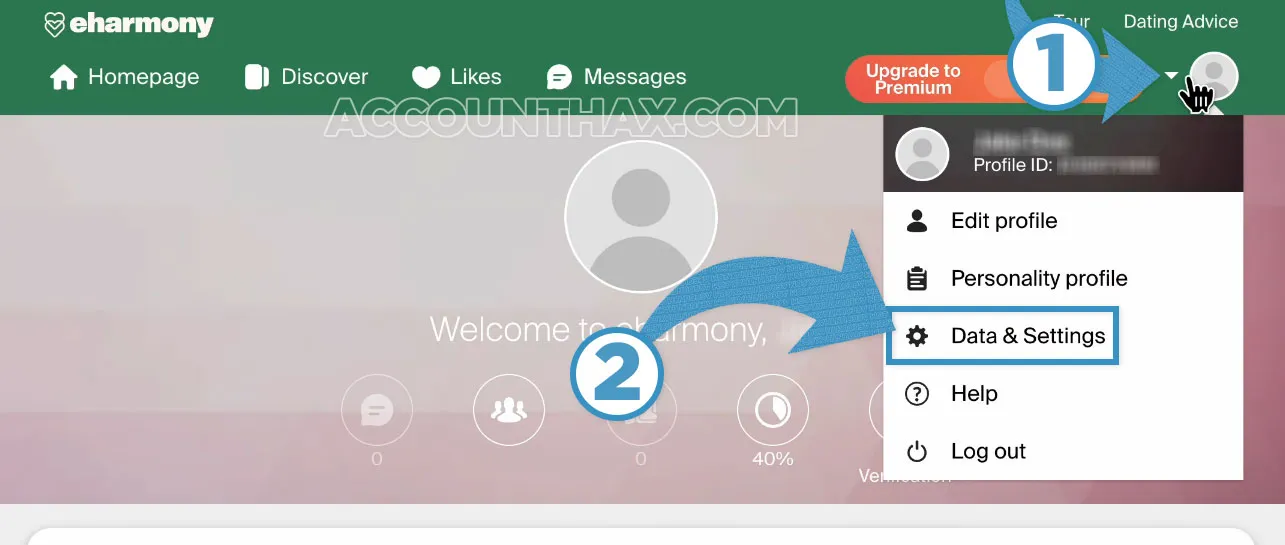
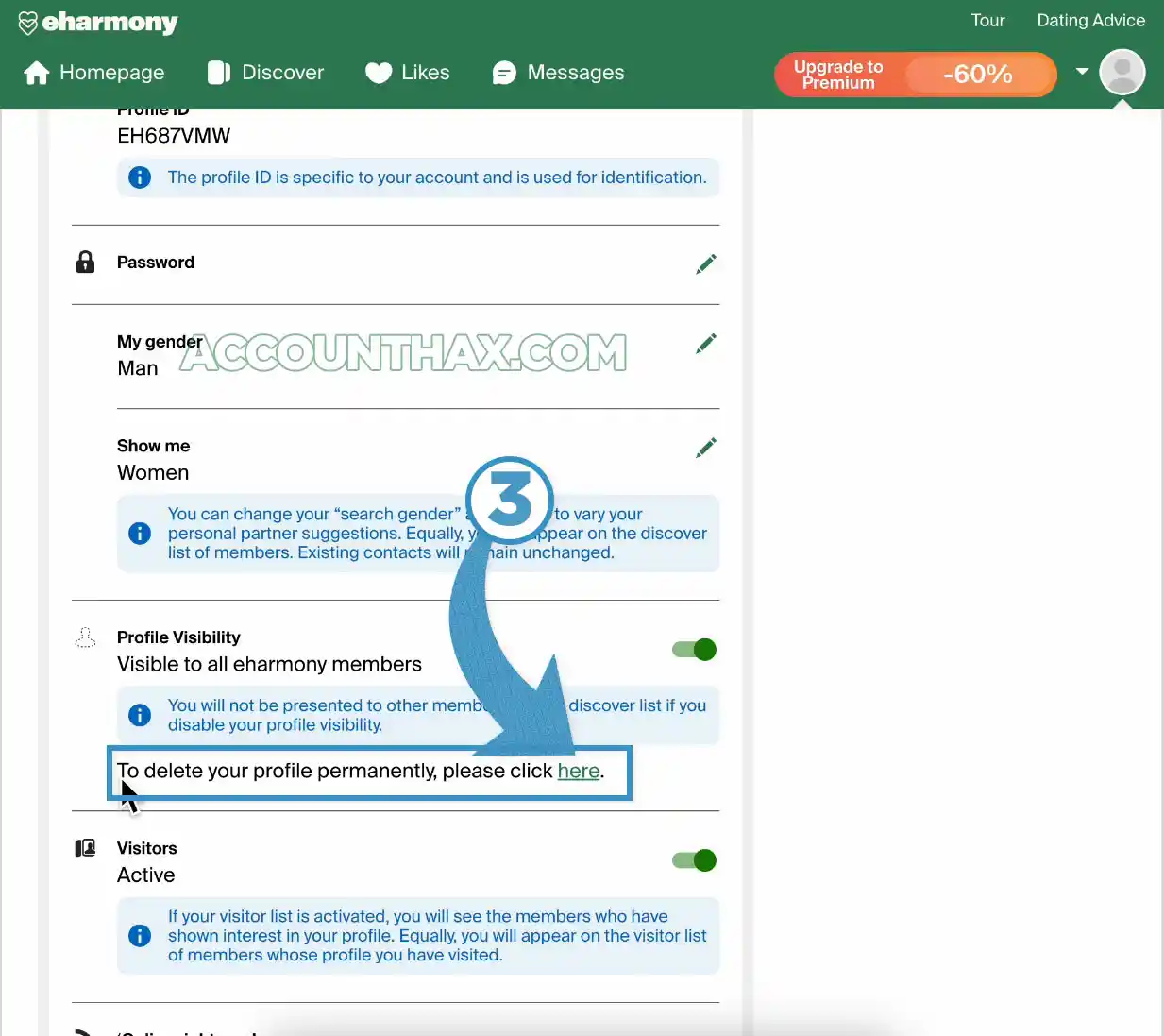
- Under Profile status, click “To permanently delete your profile, click here,”
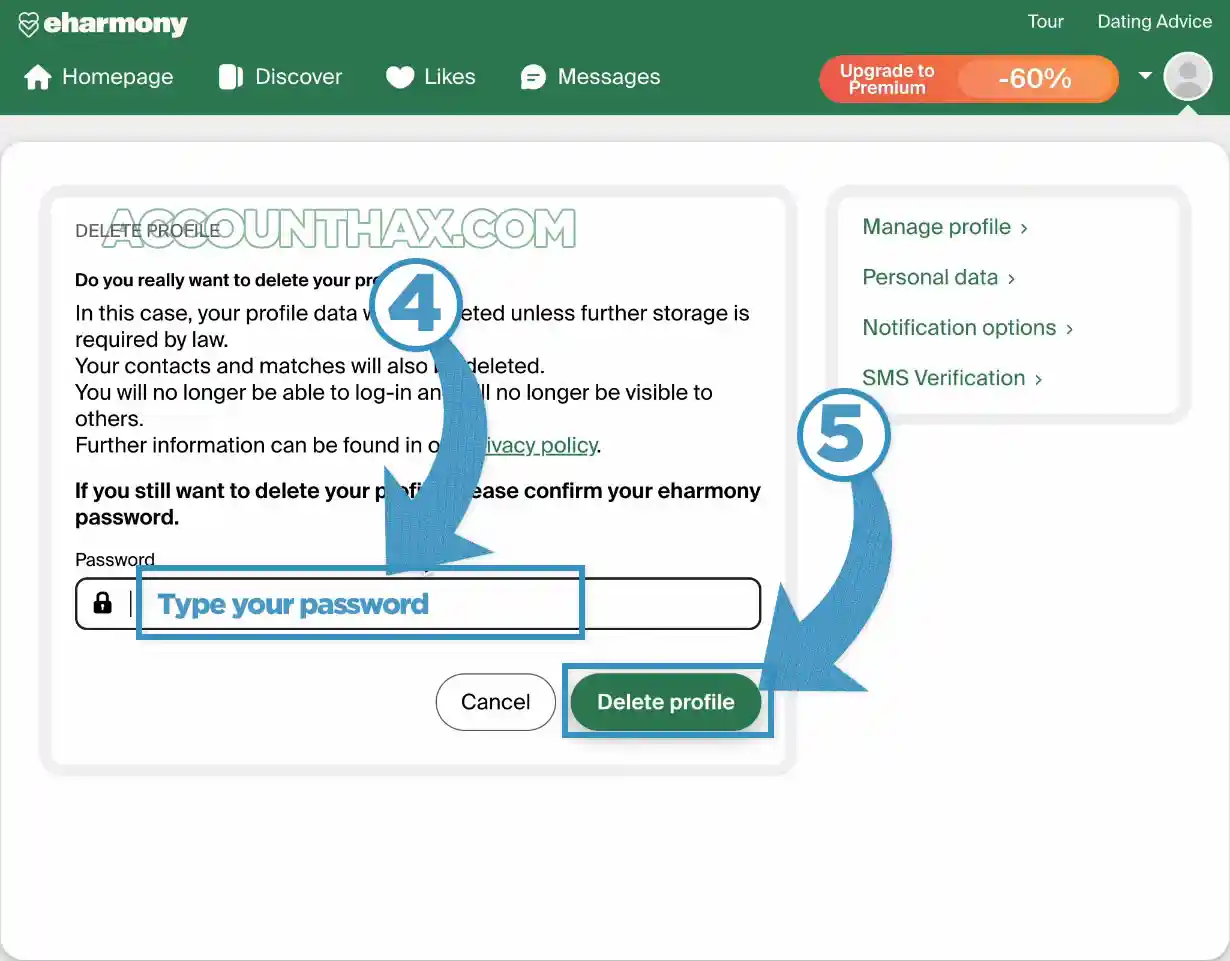
- Then enter the account password and click on Delete profile.
Reasons to delete eHarmony account
- Found someone and don’t want a dating profile online anymore.
- Taking a long break or switching to a different platform.
- Privacy cleanup: prefer not to store personal data when not using the service.
Recovery after deletion and creating a new account later
- After deletion: Once you have deleted your Eharmony account, restoration isn’t available; the profile and data are removed and can’t be recovered. Hiding is the reversible option if unsure.
- New account later: You can always sign up again with the same email after deletion, but it’s a fresh start—new questionnaire, new profile, and no old conversations or favorites
Deleting eHarmony Account-FAQs
How long does deletion take to complete?
Deletion is typically immediate after confirmation, though some guides note it can take up to a day to fully propagate across systems.
Is hiding the account same as deleting account?
No. Hiding makes the profile invisible to new matches but keeps the account and data; deleting permanently removes the profile and personal data and can’t be undone.
Can the account be reactivated after deletion?
No. Deletion is permanent; to return, create a new account and start fresh.
Can I delete my eHarmony account if I still have a paid plan active?
Not immediately. Turn off auto‑renew first and wait for the term to end, or contact Customer Care to start the deletion process while mid‑term, depending on eligibility and region.
Does deleting my account cancel my subscription automatically?
No. Cancel auto‑renew where the plan was purchased (web, Apple, or Google) so billing stops; then delete the account when the term ends to remove the profile and data.
Is hiding my profile enough to stop matches and messages?
Hiding removes visibility to new matches, but people already in contact or who favorited the profile may still see it; use deletion for a full removal.
Will my messages and matches be kept after I delete?
No. Deletion is permanent and removes access to messages and matches; save anything needed before confirming.
Conclusion
Deleting an eHarmony account is simple once auto‑renew is handled: cancel the subscription where it was bought, wait for the term to end (or contact Customer Care), then use Data & Settings to permanently delete the profile. If it’s just a pause, hide the profile instead; if leaving for good, remember deletion is permanent and starting over later means a brand‑new profile.