
Are you looking to delete your Klarna account—whether for financial privacy, to clear out “Buy Now, Pay Later” temptations, or to erase your personal data?
Despite this staggering growth, BNPL can get overwhelming pretty easily. If you’re tired of using such apps and want to return to traditional payment methods.
Lots of folks decide to close their Klarna accounts every year, and it’s a smoother process than you might expect. Here’s a straightforward guide—no jargon, just steps you can actually use.
KEYNOTES: DELETING KLARNA ACCOUNT
To delete your Klarna account, first pay off any outstanding balances. Then, log in to your Klarna app or website, go to Profile > Security and Privacy > Privacy Rights, and select Delete Personal Information. Finally, contact Klarna support to confirm account closure and data deletion.
Before You Delete
1. Pay Off Any Klarna Balances.
Head to Payment Methods in the app or Klarna’s website. Tap each card or bank account and select remove. This keeps your financial info protected after you close your account.
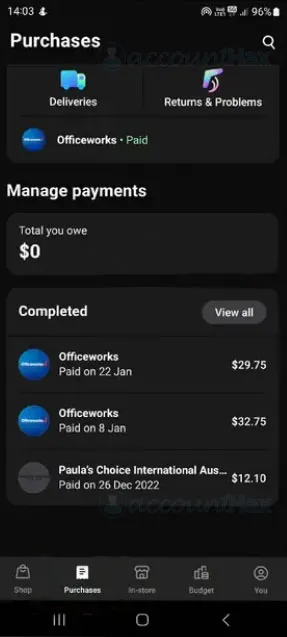
- Open the Klarna app and navigate to Purchases section.
- Make sure Total you owe reflects the $0.
2. Download Your Statements.
Once you delete your Klarna account, your order history and receipts are gone for good. If you want a record of your past activity, grab your statements now.
3. Remove Saved Payment Methods.
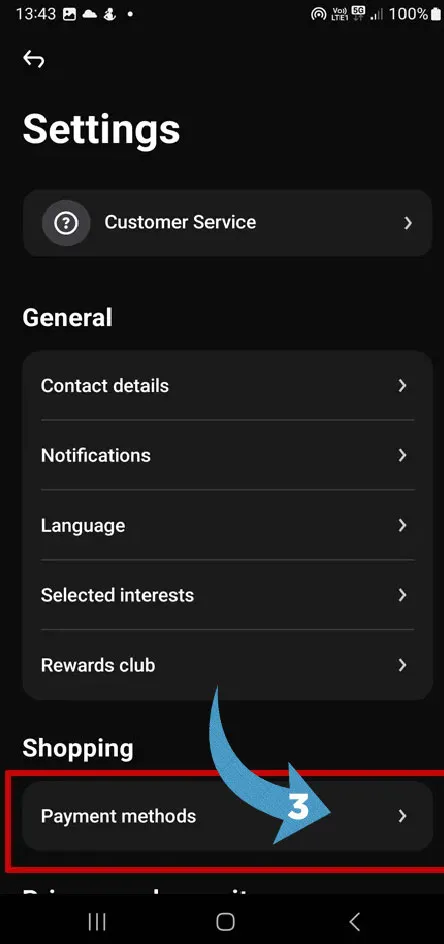
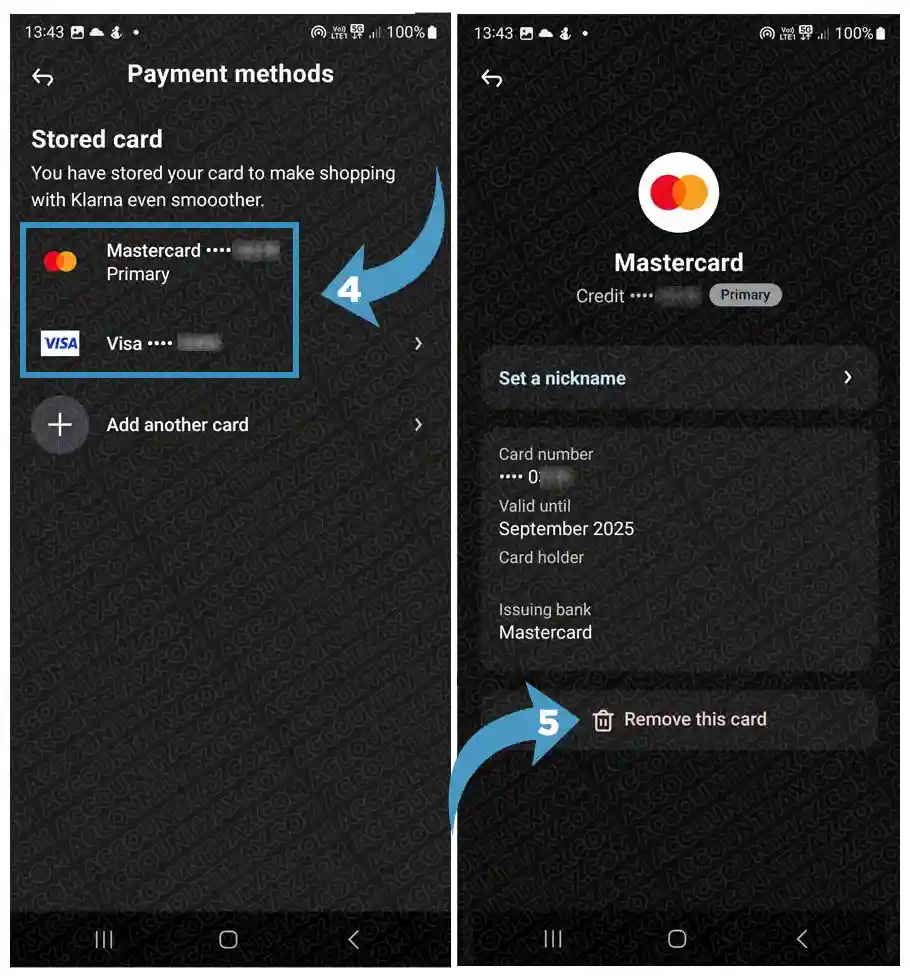
Head to Payment Methods in the app or Klarna’s website. Tap each card or bank account and select remove. This keeps your financial info protected after you close your account.
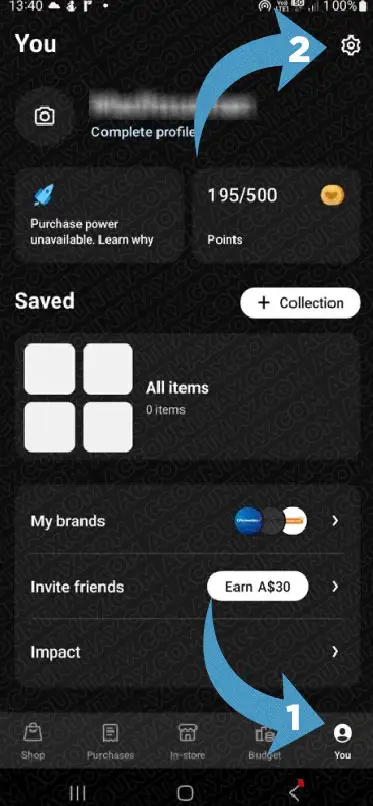
- Open the Klarna App Go to Profile>Settings.
- Navigate to the Payment Methods section.
- Tap the card/cards you want to remove.
- Click “Remove saved card” and confirm by selecting “Remove this card.”
4. Turn Off Auto-Payment.
In the app’s Control Center under Privacy & Security, find “Autofill at Checkout” and switch it off to protect your data.
- Open the Control Center.
- Go to the Privacy and Security menu.
- Select the Autofill at Checkout option.
- Toggle the autofill feature off.
Properly deactivating your Klarna account ensures your payment information is protected and unwanted spending is curbed.
Delete Klarna Account Permanently? (Web & App)
Once you have cleared the outstanding balance and closed all the pending orders, it’s time to delete the account. Here is the methods to delete your Klarna account on website and Klarna mobile app.
How to Delete Your Klarna Account on the App.(Email/Live Service)
- Log in to your Klarna app.
- Tap Profile (sometimes shown as “You” at the bottom).
- Click the Help button next to settings.
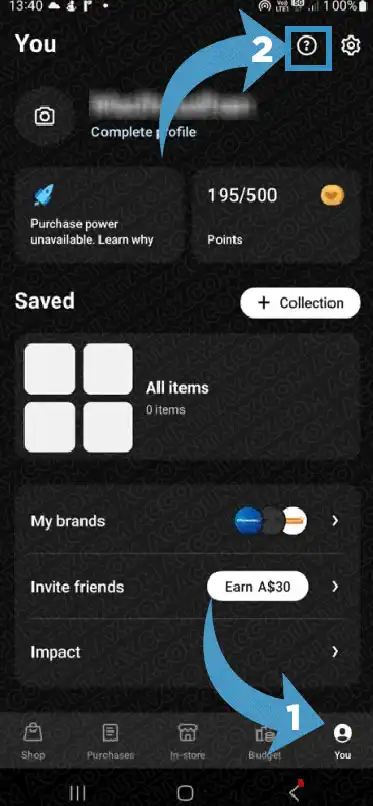
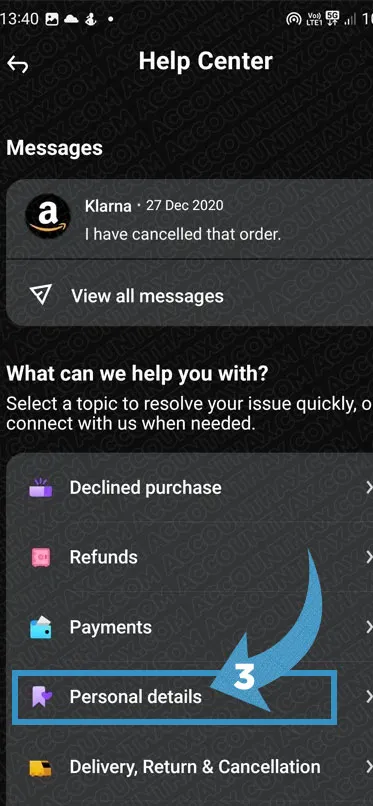
- Tap Personal details.
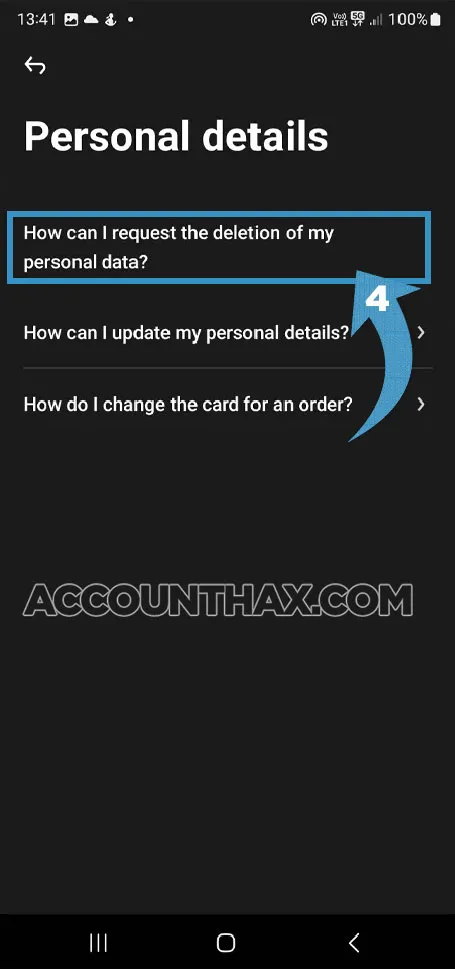
- Here, tap on “How can I request the deletion of my personal data?” Option.
- Tap Contact Us, and tap on “Leave a message” to compose a formal message to Klarna support with your request to close and delete your account. You can also select the Live Chat option to write the message to delete your Klarna account in your own words.
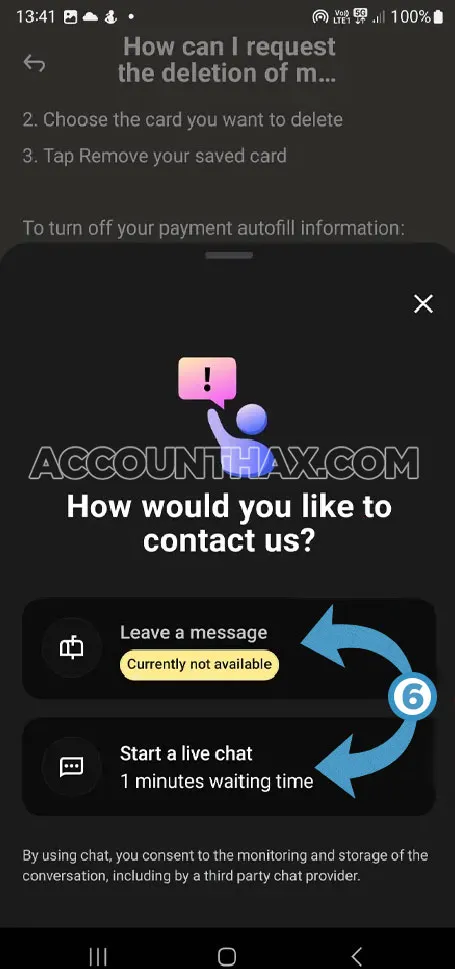
- Once done tap on Send message.
How to Delete Your Klarna Account on the Web.
- Log in at klarna.com on your browser.
- Click your profile picture or name in the corner to access account settings.
- Head to the Security and privacy or Settings section.
- Look for a privacy/data tab and choose the option to delete your account or personal data.
- (If you don’t see a delete option:) Use the site’s live chat or support email to request account and data deletion.
Mention that you want all your personal information erased, not just account deactivation.
How long does it take to delete Klarna data?
For live chat or personalized help, visit Klarna’s Customer Service portal.
Account deletion is typically effective immediately on your profile, but complete removal of your data from backend systems can take several days to weeks, depending on legal and operational requirements.
What happens when I delete my Klarna account?
When you delete your Klarna account, your personal data and payment information are removed except for data legally required to be retained. You will lose access to services, transaction history, and must create a new account to use Klarna again.
Is There a Way to Pause or Temporarily Disable Klarna?
If you’re not sure about permanently deleting your account, you might want to just step away from Klarna for a bit. While Klarna doesn’t offer a direct “pause” or “temporary disable” button, you can remove your payment methods and uninstall the app to keep your profile inactive.
This way, your information stays safe, and if you change your mind or need the service again, you can simply sign back in and reconnect your payment details. Think of it as taking a break without burning the bridge.
How to Cancel Klarna in Case of Fraud or Account Hacking.
If you suspect someone has accessed your Klarna account without permission, act fast. Change your Klarna password immediately and review your recent purchases for anything suspicious.
Next, contact Klarna’s customer support as soon as possible—most platforms have a dedicated help line or live chat for fraud issues.
Explain the situation and request to freeze or delete your account. They may ask for ID verification to protect your information. Finally, inform your bank or card provider of possible fraud, so they can watch for unauthorized transactions.
Can I recover my Klarna account after deletion?
Unfortunately, no. Deleting your Klarna account is final. Once support wipes your account and personal info, you can’t log in or get your data back. If you change your mind down the road, you can always sign up for a brand new Klarna account—just know your old history is gone.
You can also use prepaid cards or cash to reduce impulse purchases. A little planning goes a long way—track your top five monthly “wants” versus “needs” to see where your money truly goes.
How to Check If Your Klarna Account Is Actually Deleted.
After going through the steps to delete your Klarna account, you’ll want to confirm it’s truly closed. First, try logging in a few days after your request—if the system doesn’t recognize your email or password, your account is gone.
You should also receive an email from Klarna confirming the closure. If you don’t get a confirmation within a week, contact customer service to double-check.
You can also try resetting your password; a failed attempt indicates your account has been deleted.
Does Deleting Klarna Affect Your Credit Score?
Generally, deleting your Klarna account won’t hurt your credit score, because Klarna only reports missed or overdue payments to credit bureaus—not open or closed accounts.
If you settled all your balances responsibly before closing, your credit history remains in good standing. However, if you’re in the middle of a payment plan or have missed payments when you close your account, it could impact your score.
Always make sure your payment record is clean before saying goodbye to any financial service.
Tips to Avoid Klarna Temptation in the Future.
“Buy Now, Pay Later” can be tempting, especially during sales or holiday seasons! If you want to avoid the allure after deleting Klarna, try budgeting apps that limit spending, unsubscribe from online shopping emails, and remove saved cards from other e-commerce sites.
Delete Klarna Account: FAQs
What’s the fastest way to close my Klarna account?
Via the Klarna app: Profile > Security and privacy > Privacy rights > Delete personal information, or message support directly.
Do I need to contact Klarna support?
Usually, yes; even if you use settings, Klarna may route you to customer service to finish the process.
How long does account deletion take?
Most requests are completed in a few days, but it can sometimes take a week, especially if there are open purchases.
Can I delete just my payment info without closing my account?
Absolutely! Remove payment methods in the Payment Methods section—handy if you just want a break.
Are refunds possible after deleting my account?
If you’re owed a refund, finish the process before you close your account, or reach out to Klarna support for help.
Final Thoughts
Deleting Klarna is a straightforward process. For maximum privacy, be proactive about wiping your personal information and payment details. Also, deleting your Klarna account is a big step towards taking control of your money—and your personal info. Take care of your balances, download what you need, and reach out to Klarna’s friendly support team for help. Remember, you can always jump back in and make a new account later if you want. Good luck with your next chapter!